Showing posts with label Twitter. Show all posts

How to Mass Unfollow People on Twitter with a Reason

Date 14/4/2013
Sometimes there are genuine reasons why you may want to clean-up your Twitter friends list and unfollow some people.

For instance, some of them may be writing tweets at the speed of light thus hijacking your entire Twitter timeline. Then there are souls who have either quit Twitter or have not bothered to write a single tweet in the past ten weeks but are still taking a slot in your friends list.


Share/Bookmark

Real-time Local Twitter Trends

Date 17/03/2013
Twitter can be an excellent source for trend analysis. Twitter itself displays several popular topics on its frontpage which are sorted by minute, day and week. It does become more difficulty to spot trends if they are not displayed on the Twitter homepage though. The two problems that arise are finding those trends if they are not displayed on the Twitter website and that it is near impossible to find local trends as they are not displayed by Twitter and also not available via filtering options on the social messaging site.


Share/Bookmark

Schedule Your Future Tweets With Twuffer

Date 10/3/2013
If you use Twitter personally or as an organization, you might want the ability to post tweets for the future, or schedule a number of them. You might not be able to sleep without twittering once an hour, you might be doing an important marketing campaign, whatever the reason, Twuffer is great at what it does, scheduling tweets.

It is a breeze to use, you don’t even have to sign up, you can use your existing Twitter username and password and off you go. You can use it as a regular Twitter client, but you also have the additional option to choose a date and time. Twitter nuts might find the hourly option a bit restricting you can’t specify an exact time, you either tweet at 2am or 3am, nothing in between.


Share/Bookmark

MetroTwit A Twitter Desktop Application With Windows 8 Support

Date 5/3/2013
The Twitter homepage is not really the most comfortable place to manage your tweets, followers and read tweets and messages by other users. One of the restrictions for instance is that you can only keep one screen open in a tab at a time. Keeping track of multiple topics (read searches) on Twitter at the same time is only possible if you perform then in different tabs. While your desktop resolution may be big enough to keep multiple browser windows open at the same time, it is not the most comfortable thing to do.


Share/Bookmark

How to Disable Twitters’ Weekly Email Digest

Date 27/2/2013
If you have a Twitter account, and who does not, you may have heard about the weekly email digest that Twitter has been working on for a while. The digest is a personal newsletter that is featuring Tweets and stories shared by people each individual user is connected to on Twitter.
The design resembles Twitter’s Discover tab which is highlighting trending stories on Twitter. Unlike Discover, the stories and information that the weekly email digest includes are personalized for each Twitter user.


Share/Bookmark

How to Download Your Twitter Archive In to Your Local System

Date 19/2/2013
Just like me you all of Twitter users up until now had only one option at their disposal to access past messages that they have posted on the social messaging site: to browse the tweets manually on the site itself. This was not really practicable at all and while search may have helped find messages of interest, a missing backup or export feature to local computer systems was something that many Twitter users missed dearly as they could make good use of it.


Share/Bookmark

Visualize your Year on Twitter with Vizify

Date 6/2/2013
Do you have a Twitter account,then you should try take your year on Twitter with vizify. 

This awesome Twitter app reads your Twitter activity and come with all your years activity like what you tweet ,  natural tweet by you reveling top followers, your most-retweeted posts, and interesting details about you. The status mentioned in the infographic are calcuted using the last 3200 tweets that you have posted on twitter.

One good thing about Tweetsheet that only requires “read access” to your Twitter account during authentication so it won’t tweet your results without asking. There’s however no option to save the infographic as an image.Here's snapshot of my twitter activity.


Share/Bookmark

Facebook,Twitter and Google+ Sharing Experiment

Date 4/2/2013
We all know that in the social media world Facebook,Twitter,Myspace,LinkedIn and Google+ are the  most active social networks at this time, where billions of good content of pieces are shared by everyone each and every day.

I read somewhere about this magical idea that more than 200 million tweets are written every day by 100+ million users on Twitter while the numbers are even more impressive for Facebook. More then 800 million users of Facebook like and share more than 2 billion posts per day. Google+ is growing at an impressive rate in the terms of groath rate but is still a relatively small player with 43+million users.


Share/Bookmark

Social Networking Add-ins For Microsoft Outlook

Date 1/2/2013

Here's list of social networking Add-ins for Microsoft Outlook 

1. Outsync (Facebook) – With the help of this utility you can find and matching contacts who are listed in your Outlook address book and are also connected with you on Facebook. And this will then automatically update the picture of such contacts in your Outlook address book using their latest profile picture from Facebook. This is especially nice if you sync your mobile-phone with Outlook, since now you will you have your contact’s picture on your screen when they call you.


Share/Bookmark

Create Your Fake Screenshots

Date  9/1/2013

Don’t believe everything you see on the Internet because screenshots can be easily faked. Sometimes these fake images are for pure fun – like you putting your picture on the cover of TIME magazine, sometimes they may be deceptive.


Share/Bookmark

Prevent Your Twitter Post From Auto-Converting Links Into Hyperlinks

Date 8/1/2013
If a tweet contains two words that are separated by a dot (or period), Twitter – and the various apps like Tweetdeck – may sometimes interpret that combination as a web address and will auto-convert the words into a clickable link wrapped inside a t.co URL.


Share/Bookmark

An Easy Way to Write A Long Tweets on Twitter

Date 6/1/2013
If you are to ever write a tweet that’s longer than 140 characters, you have a couple of options. You can either split the message into multiple tweets or you can use a service like post.ly that not only lets you compose essay-style messages but you may also attach documents, pictures and other files to your tweets.


Share/Bookmark

How to Use One Gmail Address For Multiple Twitter Account?

Date 4/1/2013
Some time ago I was facing a problem related to my twitter account, I create my twitter account with my primary email address. And don't know how did someone hack my account or something else but not able to regain my twitter account again.


Share/Bookmark

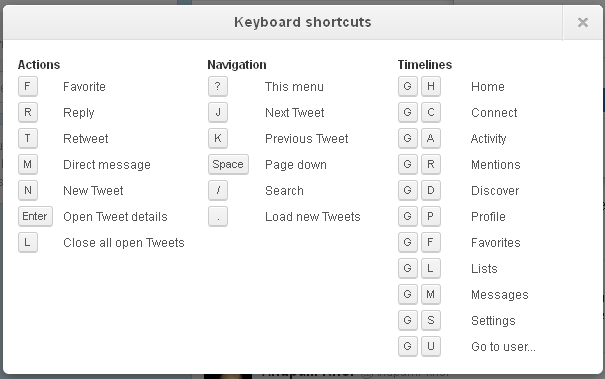
Use Twitter With the Help of Keyboard Shortcut

Here You can find some useful keyboard shortcut for twitter without using mouse.


Share/Bookmark